Use Cases

.png)
Shipping an AI avatar has many unknowns, but the one of the biggest is almost always cost. "What happens if I turn on an Open AI voice or an ElevenLabs voice?" "Does long-term memory double the price?" "How much does GPT-4o-mini really save me over 4o?"
We built the Convai Interactive Credit Calculator to kill that uncertainty. It’s a live, public tool that lets you plan, price, and optimize your AI characters before you ship. You can easily estimate the credits your AI avatars or characters will consume per interaction, based on the exact features you turn on: LLM choice, memory, knowledge bank, perception (STT/vision/scene metadata), AI voice (TTS), face/body animation, actions, and base server needs.
👉 Try it here: credit-calculator.convai.com
This isn't just a spreadsheet; it's a planning tool. It helps you:
The calculator is built around the key decisions you have to make. Here’s what you’re really choosing:
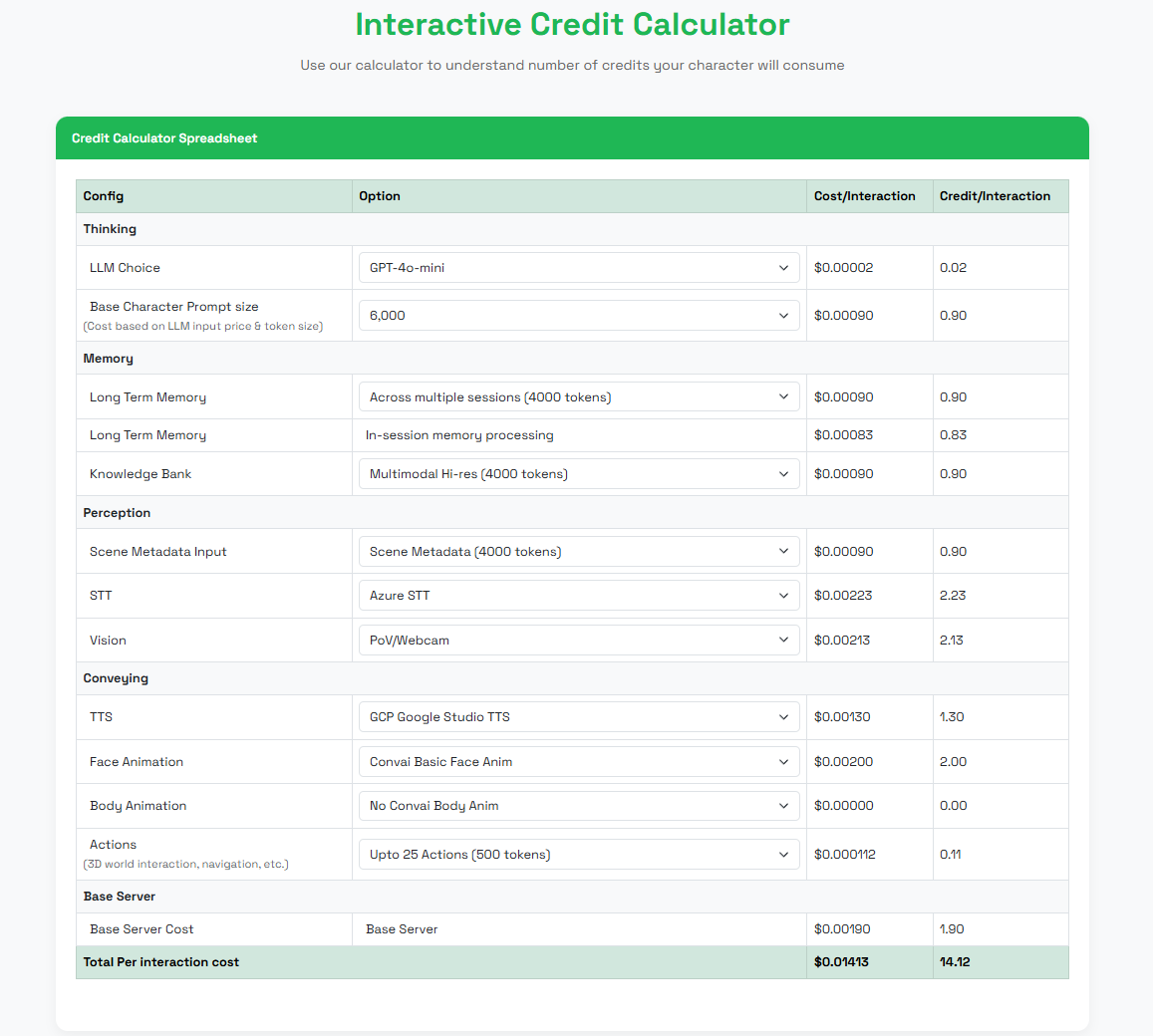
This is your character's reasoning engine. A top-tier LLM (like GPT-4o) gives you incredible nuance for training sims, but it's your biggest credit-consumer. The calculator lets you see exactly how much you save by switching to a 'mini' model for a simple FAQ bot.
Does your character need to remember past conversations? This is the slider for you. Be intentional: 'In-Session Memory' is great for short role-play, but 'Long-Term Memory' is what you need for a training sim.
This is your character's "brain." What facts are you grounding it in?
These toggles give your character "senses."
This is all about realism and presence. You can layer these on to go from a simple chatbot to a fully embodied agent.
This is the small, foundational cost for every interaction.
This is the number you're here for. As you toggle every choice above—from LLM to Animations—this total updates instantly. This is your real, defensible number for planning, budgeting, and getting stakeholder buy-in.
Here's the best way to use it: start with everything on. Build your absolute 'dream' character with a top-tier LLM, long-term memory, and AI voice. Then, look at the Total Per Interaction and start optimizing. "Do I really need premium voice for this kiosk? What if I use a text-only KB?" The calculator lets you find that perfect balance.
What is the Convai Interactive Credit Calculator?
It’s a browser tool that helps you estimate credits per interaction for your AI avatars or AI-powered characters. You can adjust options like LLM, memory, knowledge, AI voice (TTS), STT, vision, animations, and actions to see total usage in real time.
Is the calculator private?
Yes. Your inputs stay local to your browser session and are never uploaded—so you can safely explore configurations and credit costs.
Are the prices and formulas current?
Yes. The calculator automatically updates with Convai’s latest pricing formulas and partner rates for LLM, AI voice, STT, and vision.
Can I estimate the cost for adding AI voice inside my game engine projects like Unreal or Unity?
Yes. You can use the calculator to estimate how many credits your project will use when adding AI voice or speech-to-text inside Unreal or Unity. Just pick your preferred TTS and STT options to see the total credits for real-time voice, lip-sync, and dialogue.
Can I estimate the cost for enabling vision or webcam perception for my AI avatars?
Yes. Turn on Vision (PoV/Webcam) in the calculator to estimate credits for giving your AI avatar visual awareness. It’s useful for XR, Sim, or training scenarios where the character needs to “see” the environment.
Can I estimate the cost for facial animation, gestures, and lip-sync?
Yes. Enable Face Animation or Body Animation in the calculator to see how much credits it adds for realistic movement and expressions. This helps when planning AI characters or avatars that talk, gesture, or act naturally inside Unreal or Convai Sim.
Can I compare simple and advanced character builds?
Absolutely. Create a light web-based helper with minimal features or a fully embodied XR Sim character with memory, vision, and actions—then compare the total credits instantly.
How can I reduce my credits per interaction?
Lower token windows (prompt, memory, knowledge), switch to text-only knowledge, use basic AI voice, disable vision, and limit animations or actions when they aren’t required.
Where can I try the calculator?
Right here → credit-calculator.convai.com


